I've just finished the first round of VMware Server 2.0 beta testing, and although I quite like the product, it's still not stable enough for my needs, and so I've decided to fall back to VMware Server 1.0.4.
But what happens is that every time you try to use the VMware Server 2.0 virtual machine in VMware Server 1.0.4, you get an error like this:
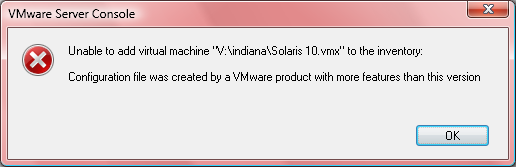
"Configuration file was created by a VMware product with more features than this version" may be a correct statement, but chances are that you won't need any of the new features of VMware Server 2.0 to use standard VMs.
Because of this, you can use a simple hack to make the new VMs work with older version of VMware Server: simply change the hardware version back.
Here's how you do it:
1) Fix the VM configuation file
Go to the directory with all the files for your VM (V:\indiana in my example), and edit the VM configuration file – the one with .vmx extension.
Change this line (should be close to the top of the file):
virtualHW.version = "6"
to this
virtualHW.version = "4"
2) Fix the VM disk configuration file
In exactly the same manner, fix the virtual machine disk file (.vmdk one:
ddb.virtualHWVersion = "6"
to look like this:
ddb.virtualHWVersion = "4"
That's all you need! After these two quick fixes your VM will be happily recognized by VMware Server 1.0.4. Enjoy!
You are the MAN! Easy enough……yet so hard to find.
thanks
Hi Steve,
Glad to have helped!
See you around!
One issue with my .vmdk file being 4GB. (Can't open it to edit it). Any advice?
Hi Vijay,
The vmdk file you're after is a small one in size. Depending on how your VM disk was created, you could have two files: YOUR_VM-flat.vmdk and YOUR_VM.vmdk.
In that case the flat file will be the actual disk image, 4Gb or whatever you set it to, while the other file will contain all the configuration.
If you have only 1 vmdk file, and it's the disk image by the look of its size, then you don't need to follow this step of the procedure.
Good luck!
As vijay, my vmdk file is the image. So I don't get the above error, but I can't start the machine. I get this:
One or more of the disks used by this virtual machine was created by an unsupported version of VMware Server. To power on or upgrade the virtual machine, either remove the unsupported disk(s) or use a version of VMware Server that supports this version of disks. Below is a list of the disks and their reported versions.
Version 6 lnx-dev.vmdk
Hi, I should emphasize that there is no file as lnx-dev-flat.mdk, only the binary lnx-dev.vmdk which I cannot edit.
Shmulik
For linux/cygwin users, the large binary file can be modified as follows:
dd "if=source.vmdk" | sed "/virtualHWVersion = \"6\"/s//virtualHWVersion = \"4\"/" > modified.vmdk
(By using dd you can send it a kill -SIGUSR1 and it'll print how far through the file the processing is. Otherwise change the command so it's simply to sed … modified.vmdk)
Thanks for an excellent advice, Peter!
Any advice for windows users on this issue?
Thanks
Karola
Cheers Peter – That works!
advice for windows users would be a big help 😉
Karola, what's the question?
If you install cygwin which gives you a command prompt at which you can run that command I posted for Linux users; the one thing to remember is that in cygwin C:\ becomes /cygdrive/c/
Another option for Windows is to use a disk sector editor (HxD works well and is free) to modify the data directly on disk, without opening the file.
For Windows users:
I used uedit32.exe to open the big vmdk file made the modification and saved it.
It work.
My .vmdk file is 120 GB and i´ve no other file called flat.vmdk!
What could i do ?
Hmm. Thanks.
VMware server console just died when I tried this. 🙁
Martin,
Were you able to restart the console? I presume this could have happened if server was still trying to manage (run) the same VM which you altered. Obviously, VM needs to be offlined before you make any changes. It's just that due to the problem VM is usually offline anyway as it won't start until you fix the version number.
Y, I restarted the console but the same thing happens over and over again.
I even restarted vmware (service vmware stop; service vmware stop). Same thing happens when I try to open it again.
The only other thing I can think of is that the image has a snapshot. I'd happily delete that if it means the image can work on vmware server 1.0.x
Vmware server 2.0 rc1 is out, I know; I'd rather avoid that I think.
I'm in #vmware on irc.freenode.net, by the way.
If you're a windows user, well, tough luck, coz you shouldn't be using it 😛
p.s. Thanx Gleb!
Thanks Gleb….gr8 info 🙂
For Windows Users.
To edit very large files, such as .vmdk disks, you can install a HEX Editor.
I tested, as an example, the freeware
http://www.free-hex-editor.com/.
You have to pay great attention to change only the number 6 to 4 and do nothing else, or your virtual drive may become unusable.
Obviously I suggest to do a bcakup, first… 🙂
Thanks everyone for constantly adding more useful tips on this problem!
Got an error after running dd to change the virtualHWVersion.
"unable to get the information for disk (SCSI 0:0)
Unable to open file /vmware/backup/backup.vmdk": this file specified is not a virtual disk.
Thanks for ur input..It really help ! U r the man..Save my life..
Thanks a lot.
Thanks dude. Saved me a lot of time
You are a vmware god! Muchisimo gracias, hombre!
Thanks a lot for this tip:
For VMWARE server version 2.0.0 virtualHWVersion is 7 instead of 6..
You're a VM saviour – Thanks!
Here's what happened:
My VMware is version 6.5.
I installed a Guest OS (Windows Server 2008) with 50gb virtual drive C.
I created a 2nd virtual disk of 30gb as drive D.
I had another Guest OS (WinXP) – BUT it was created with VMware version 6.
I wanted to mount storage D to this WinXP – just to see if it can recognize it, turned out it didn't.
But because of your blog, I did this:
1. Edited Windows XP .vmx file changed it to version 7 from 6.
2. Didn't have to edit storage drive 20gb anymore because it is already version 7.
In other words, you just need to match both vmx and vmdk files to same versions.
Hope this helps.
This was helpful. I had a similar problem where the image I was trying to load was version "7" and the hardware my server had created was version "4". Setting the image's version number to "4" worked just fine.
However, setting the version within the .vmx file to "7" as I first did, did not work.
Nice tip!
Thanks man, you saved my day 🙂
thanks so much.. changing the h/w type from "7" to "4" for a VMWare Serve 2.0 vmdk then allowed me to fire up the virtual disk in vmware server 1.0.10 (should be fine for 1.0.9, 1.0.8 etc)
just to make sure, I then cloned the v2.0 disk into a v1.0.10 disk and used that as the system disk instead..
thanks, you saved me a lot of time